CampHaven
ChefsTemp ProTemp 2 Plus Needle Probe Wireless Meat Thermometer with Temperature Controller Unlimited Range Bluetooth & WiFi Enabled Smart Cooking Smoker Grilling BBQ Oven Kitchen (Stand + 1 Probe
ChefsTemp ProTemp 2 Plus Needle Probe Wireless Meat Thermometer with Temperature Controller Unlimited Range Bluetooth & WiFi Enabled Smart Cooking Smoker Grilling BBQ Oven Kitchen (Stand + 1 Probe
Couldn't load pickup availability
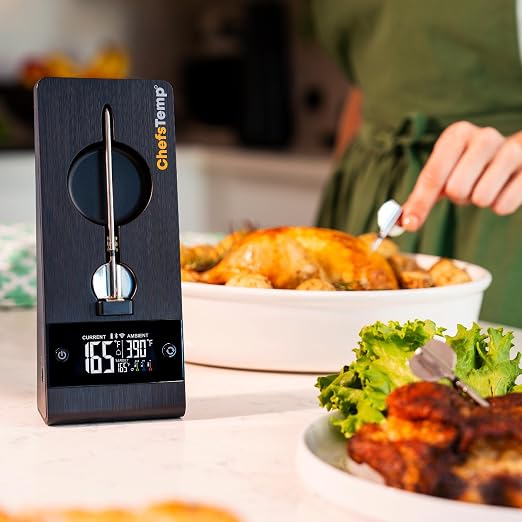
- Unlimited Range Compatibility: The first unlimited 100% wireless meat thermometer with both Wi-Fi and Bluetooth capabilities. It supports unlimited-distance real-time monitoring after Wi-Fi connection, so you never worry about limited range. Keep the stand base near the probe while in use to ensure stable performance. - Smart App & Digital Display: You can monitor the temperature remotely in real time through the mobile app and receive alerts when your food reaches the target temperature. When you’re at home and need to check temperatures frequently, you can also monitor cooking progress directly on the ProTemp 2 Plus base display?no phone required. Whether you’re relaxing at home, running errands, or even away on vacation, you can keep track of your cooking anytime, anywhere. Ideal for smart kitchen cooking, grilling, smoking, and oven use. - Long-Lasting Battery Performance: The Stand of the ProTemp 2 Plus comes with a built-in 10,000mAh large-capacity rechargeable battery, offering up to 80?100 hours of runtime in Wi-Fi mode and over 1,000 hours in Bluetooth mode. Ensure that the connection will not be lost due to insufficient power during long cooking, camping, or smoking processes, free from battery anxiety and messy charging cables! In addition, the probe itself offers up to 40 hours of battery life, ensuring continuous temperature monitoring during long cooking sessions. - High-Temp Resistant Material: Built with durable metal and ceramic materials, the ProTemp 2 Plus wireless temperature probe withstands ambient temperatures up to 1000°F (530°C) and internal temperatures up to 221°F (105°C). Perfect for direct grilling, deep frying, and other high-heat cooking.(Insert the probe past the safety notch. Ensure the food is positioned between the min/max insertion lines, and keep all parts ahead of the min insertion line inside food to avoid probe damage and inaccurate ambient temperature readings) - Multiple Probes Option: Expand your cooking options with the ability to use and charge multiple probes at the same time. You can charge and use up to 3 probes through the ProTemp 2 Plus Stand. - Ultra-thin 316-Grade Stainless Steel Probe: The ProTemp 2 Plus boasts a 4.55mm (0.17-inch) ultra-thin needle probe that leaves virtually unnoticeable marks on your protein. Premium 316-grade stainless steel delivers superior corrosion resistance against acids, humidity and fats?far better than 304?while NSF/ANSI food-grade certified to prevent metal leaching, ensuring safe, hygienic, long-lasting performance. - Smart grill temperature fan integration: The ProTemp 2 Plus seamlessly connects to and powers the ChefsTemp BBQ Breezo fan (sold separately), turning this Bluetooth wireless meat thermometer into a smart temperature control center for grilling. Its versatile design is suitable not only for indoor kitchen cooking but also for outdoor grilling. - Control Multiple Devices with One App: You can control up to 3 devices with a single app, allowing you to monitor up to 9 probes. - All-Weather Companion: The base is designed to withstand the harsh conditions of outdoor environments, featuring an IP55 waterproof rating for effective dust and rain protection. The probe itself has an IP68 (fully waterproof) rating. This makes it suitable for all weather conditions, while other similar products are limited to indoor use. - Lifetime Customer Support: Any problems with the product? We're here to help?simply contact us, and our team will quickly and effectively resolve your issues. Whether now or in the future, we will take responsibility for resolving any problems that arise, without any hassle or warranty concerns.
Product description
ProTemp 2 Plus NEW
Why is the ProTemp 2 Plus revolutionary?
Smart BBQ Temperature Fan Integration
Specifications
How can I contact the seller if I have questions about this product?
The ProTemp 2 Plus cannot connect to Bluetooth, or stuck on C-1.
Probe won’t stay connected, or frequent disconnection.
Probe cannot be charged on Plus Series Stand.
ProTemp 2 Plus can not connect to WiFi.
ChefsTemp ProTemp 2 Plus seamlessly connects to and powers the ChefsTemp BBQ Breezo Fan (sold separately), transforming this Bluetooth wireless meat thermometer into a smart temperature control hub for charcoal grilling.
How can I contact the seller if I have questions about this product?
Find our email or phone number on the ChefsTemp website, message us via Amazon, search for 'ChefsTemp' on YouTube to access our channel and tutorial videos, or join our Facebook Community for user tips and support.
The ProTemp 2 Plus cannot connect to Bluetooth, or stuck on C-1.
Make sure the ChefsTemp app has all required permissions, fully dharge the Stand and Probe, remove the probe from the Stand, then pair the device.
If needed, simply delete all existing connections in the app, reconnect your device.
Probe won’t stay connected, or frequent disconnection.
If the oven has strong sealing, it may affect the emission of probe signals. Please move the stand to a better signal location to receive the signal emitted by the probe, and test whether the base can receive Wi-Fi signals properly.
Probe cannot be charged on Plus Series Stand.
Clean the probe before charging. Adjust the metal plate in the Stand’s charging slot to ensure proper contact with the probe. If the issue persists, please record a short video showing the probe charging and send it to our email.
ProTemp 2 Plus can not connect to WiFi.
Use 2.4GHz network and ensure Wi-Fi SSID is correct. You can find it automatically by clicking the “magnifying glass” icon on the Wi-Fi settings. Enter the right password. Grant location permission to the app for better connectivity.
Share